Be yourself; Everyone else is already taken.
— Oscar Wilde.
This is the first post on my new blog. I’m just getting this new blog going, so stay tuned for more. Subscribe below to get notified when I post new updates.
Be yourself; Everyone else is already taken.
— Oscar Wilde.
This is the first post on my new blog. I’m just getting this new blog going, so stay tuned for more. Subscribe below to get notified when I post new updates.
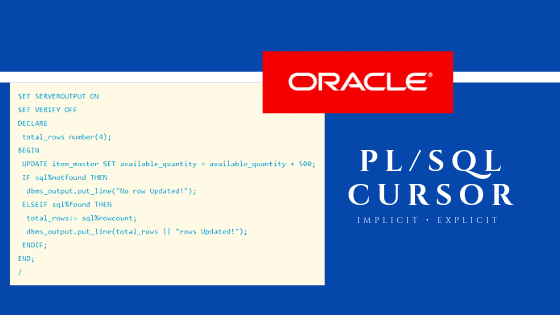
A cursor is a pointer to this context area. PL/SQL controls the context area through a cursor. A cursor holds the rows (one or more) returned by a SQL statement. The set of rows the cursor holds is referred to as the active set.
You can name a cursor so that it could be referred to in a program to fetch and process the rows returned by the SQL statement, one at a time. There are two types of cursors
Implicit cursors
Explicit cursors
Learn more on pl sql through pl sql online training
Whenever any DML operations occur in the database, an implicit cursor is created that holds the rows affected, in that particular operation. These cursors cannot be named and, hence they cannot be controlled or referred from another place of the code. We can refer only to the most recent cursor through the cursor attributes.
Explicit cursors are programmer-defined cursors for gaining more control over the context area. An explicit cursor should be defined in the declaration section of the PL/SQL Block. It is created on a SELECT Statement which returns more than one row.
Declaring the cursor
Declaring the cursor simply means to create one named context area for the ‘SELECT’ statement that is defined in the declaration part. The name of this context area is same as the cursor name.
Opening Cursor
Opening the cursor will instruct the PL/SQL to allocate the memory for this cursor. It will make the cursor ready to fetch the records.
Learn the important pl sql interview questions for an interview
Fetching Data from the Cursor
In this process, the ‘SELECT’ statement is executed and the rows fetched is stored in the allocated memory. These are now called as active sets. Fetching data from the cursor is a record-level activity that means we can access the data in a record-by-record way.
Each fetch statement will fetch one active set and holds the information of that particular record. This statement is same as ‘SELECT’ statement that fetches the record and assigns to the variable in the ‘INTO’ clause, but it will not throw any exceptions.
Closing the Cursor
Once all the record is fetched now, we need to close the cursor so that the memory allocated to this context area will be released.
This section helps you learn how to query data from the SQL Server database. We will start with a simple query that allows you to retrieve data from a single table.
This section deals with the subquery which is a query nested within another statement such as SELECT, INSERT, UPDATE or DELETE statement.
This section walks you through of using the set operators including union, intersect, and except to combine multiple result sets from the input queries.

MSBI represents Microsoft Business Intelligence. This incredible suite is made out of instruments which helps in giving best answers for Business Intelligence and Data Mining Queries. This apparatus utilizes Visual studio alongside SQL server. It enable clients to access exact and modern data for better basic leadership in an association. It offers various devices for various procedures which are required in Business Intelligence (BI) arrangements. become an expert in msbi technology through msbi online training
MSBI is isolated into 3 classifications:-
1. SSIS – SQL Server Integration Services – Integration device.
2. SSAS – SQL Server Analytical Services – Analysis device.
3. SSRS – SQL Server Reporting Services – Reporting device.
MSBI TOOLS
Microsoft gives a few devices to change your business information into data. We can utilize these instruments with the interface of Visual Studio.
SQL SERVER DATA TOOLS(SSDT)
The accompanying gives a concise depiction of BI Tools:
MSBI is made out of apparatuses which helps in giving best answers for Business Intelligence and Data Mining Queries.
These are the three devices we are utilizing for ETL, Analysis and detailing in MSBI.
SQL SERVER INTEGRATION SERVICE (SSIS)
SSIS is the ETL device from Microsoft.
Combination Services is a stage for building superior information mix and work process arrangements, including extraction, change and stacking (ETL) activities for information warehousing.
We can process the information from different areas and different arrangements (source areas) and spare the information into a brought together archive as a Data Warehouse/Data Mart (goal). become an professional expert in msbi through msbi training
It incorporates graphical devices and wizards for building and troubleshooting bundles.
This device is utilized for the mix like hoodwinking the information starting with one database then onto the next like from Oracle to SQL Server or from Excel to Sql Server and so forth.
This device is likewise utilized for mass exchanges in the database like embeddings lac’s of records without a moment’s delay.
SQL SERVER ANALYSIS SERVICE (SSAS)
This is the way toward changing over two dimensional (lines and sections/OLTP) information into multi-dimensional information model (OLTP). This will assist you with analyzing the huge volume of information.
This apparatus is utilized to break down the presentation of the sql server as far as burden adjusting, overwhelming information, exchange and so forth. So it is pretty much identified with organization of the SQL Server utilizing this apparatus.
This is incredible asset and through this we can break down the information embeddings in to the database like what number of exchanges occurs in a second and so forth
PL/SQL is a combination of SQL along with the procedural features of programming languages. It was developed by Oracle Corporation in the early 90’s to enhance the capabilities of SQL. PL/SQL is one of three key programming languages embedded in the Oracle Database, along with SQL itself and Java. This tutorial will give you great understanding on PL/SQL to proceed with Oracle database and other advanced RDBMS concepts. learn on pl sql through pl sql online training
This tutorial is designed for Software Professionals, who are willing to learn PL/SQL Programming Language in simple and easy steps. This tutorial will give you great understanding on PL/SQL Programming concepts, and after completing this tutorial, you will be at an intermediate level of expertise from where you can take yourself to a higher level of expertise.
Before proceeding with this tutorial, you should have a basic understanding of software basic concepts like what is database, source code, text editor and execution of programs, etc. If you already have an understanding on SQL and other computer programming language, then it will be an added advantage to proceed.
This is an example post, originally published as part of Blogging University. Enroll in one of our ten programs, and start your blog right.
You’re going to publish a post today. Don’t worry about how your blog looks. Don’t worry if you haven’t given it a name yet, or you’re feeling overwhelmed. Just click the “New Post” button, and tell us why you’re here.
Why do this?
The post can be short or long, a personal intro to your life or a bloggy mission statement, a manifesto for the future or a simple outline of your the types of things you hope to publish.
To help you get started, here are a few questions:
You’re not locked into any of this; one of the wonderful things about blogs is how they constantly evolve as we learn, grow, and interact with one another — but it’s good to know where and why you started, and articulating your goals may just give you a few other post ideas.
Can’t think how to get started? Just write the first thing that pops into your head. Anne Lamott, author of a book on writing we love, says that you need to give yourself permission to write a “crappy first draft”. Anne makes a great point — just start writing, and worry about editing it later.
When you’re ready to publish, give your post three to five tags that describe your blog’s focus — writing, photography, fiction, parenting, food, cars, movies, sports, whatever. These tags will help others who care about your topics find you in the Reader. Make sure one of the tags is “zerotohero,” so other new bloggers can find you, too.
Have a WordPress.com account? Log in now.

